xuhao 发布的文章

二叉树是什么?

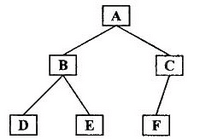
  • 树中每个节点最多只能有两个子节点
  • 在JS中通常用Object来模拟二叉树

tree.png

先序遍历算法

  • 访问根节点
  • 对根节点的左子树进行先序遍历
  • 对根节点的右子树进行先序遍历
  • 对应上图即为:A-B-D-E-C-F

我们先建立一颗二叉树

// 二叉树 bt.js
const bt = {
  val: 1,
  left: {
    val: 2,
    left: {
      val: 4,
      left: null,
      right: null
    },
    right: {
      val: 5,
      left: null,
      right: null
    }
  },
  right: {
    val: 3,
    left: {
      val: 6,
      left: null,
      right: null
    },
    right: {
      val: 7,
      left: null,
      right: null
    }
  }
}
module.exports = bt;

先序遍历(递归版)

const bt = require('./bt');
const preorder = (root)=> {
  if(!root){ return; }
  console.log(root.val)
  preorder(root.left);
  preorder(root.right);
}
preorder(bt);
// 1 2 4 5 3 6 7

先序遍历(非递归版)

// 先序遍历(非递归版)核心思路用堆栈,因为在函授中调用另一个函数其实就是连续的调用堆栈,即递归版的原理
const bt = require('./bt');
const preorderPlus = (root) =>{
  if(!root){ return; }
  const stack = [root];
  while(stack.length){
    const n = stack.pop(); // 最开始访问根节点的值,循环到以后就是部分子树的根节点
    console.log(n.val);
    // 栈:后进先出 所以需要先推right
    if(n.right){// 递归右子树
      stack.push(n.right);
    }
    if(n.left){ // 递归左子树
      stack.push(n.left);
    }
  }
}
preorderPlus(bt)
// 1 2 4 5 3 6 7

中序遍历算法

  • 对根节点的左子树进行中序遍历
  • 访问根节点
  • 对根节点的右子树进行中序遍历
  • 对应上图即为:D-B-E-A-F-C

    中序遍历(递归版)

    const bt = require('./bt');
    const inorder = (root)=>{
    if(!root){ return; }
    inorder(root.left);
    console.log(root.val);
    inorder(root.right);
    }
    inorder(bt)
    // 4 2 5 1 6 3 7

中序遍历(非递归版)

const bt = require('./bt');
const inorderPlus = (root)=>{
  if(!root){ return; }
  // 核心思路:遍历所有左子树->根节点->右子树
  const stack = [];
  let p = root; // 指针
  while(stack.length || p){ // 循环1,2,3,4
    while(p){
      // 1.把所有子树丢入栈中
      stack.push(p);
      p = p.left;
    }
    // 2.弹出最尽头的节点
    const n = stack.pop();
    // 3.访问最尽头的节点
    console.log(n.val);
    // 4.访问右节点(指针指向右节点)
    p = n.right;
  }
}
inorderPlus(bt)
// 4 2 5 1 6 3 7

后续遍历算法

  • 对根节点的左子树进行后续遍历
  • 对根节点的右子树进行后续遍历
  • 访问根节点
  • 对应上图即为:D-E-B-F-C-A

    后序遍历(递归版)

    // 后续遍历的实现
    const bt = require('./bt');
    const postorder = (root)=>{
    if(!root){ return; }
    postorder(root.left);
    postorder(root.right);
    console.log(root.val);
    }
    // postorder(bt)
    // 4 5 2 6 7 3 1

后序遍历(非递归版)

const bt = require('./bt');
const postorderPlus = (root)=>{
  // 核心思路:
  // 1. 把后续遍历的顺序倒置(左右根->根右左,与先序遍历很像)
  // 2. 把先序遍历的访问操作,改成入栈操作
  // 3. 利用栈的后进先出特性,子节点逆序输出
  if(!root){ return; }
  const outputStack = []; // 做倒置操作的堆栈
  const stack = [root]; // 函数调用堆栈
    while(stack.length){ // 根右左
      const n = stack.pop();
      outputStack.push(n);
      if(n.left){
        stack.push(n.left);
      }
      if(n.right){
        stack.push(n.right);
      }
    }
    while(outputStack.length){ // 倒序输出
      const n = outputStack.pop();
      console.log(n.val);
    }
}
postorderPlus(bt) 
// 4 5 2 6 7 3 1
什么是树的深度/广度优先遍历?

  • 深度优先遍历:尽可能深的搜索树的分支
  • 广度优先遍历:先访问离根节点最近的节点

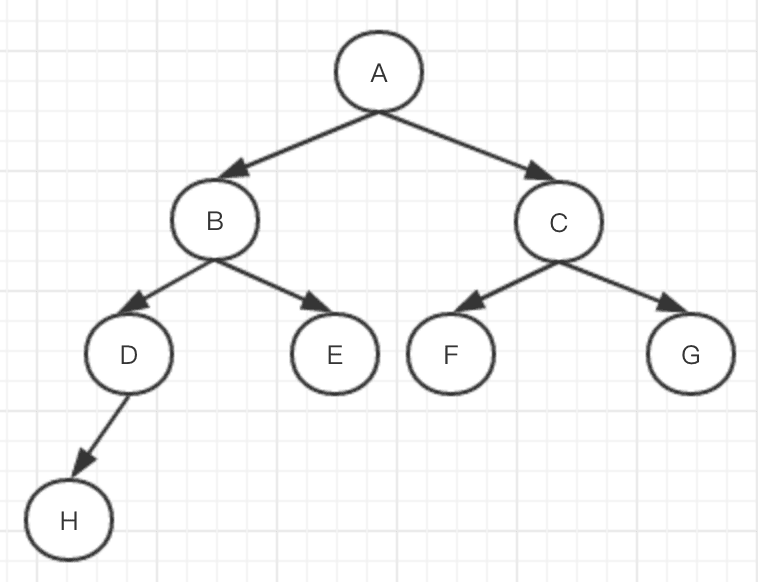
树图示例.jpeg

  • 深度优先遍历,如上图所示,会先访问根节点A,然后沿着左树一直向下深层访问遍历,即A-B-D-H-E-C-F-G
  • 广度优先遍历,如上图所示,会先访问根节点A,然后向下一层,并将该层访问遍历完毕,再继续向下一层遍历。即A-B-C-D-E-F-G-H

深度优先遍历算法

  • 访问根节点
  • 对根节点的children挨个进行深度优先遍历
    
    const tree = {
    val: 'a',
    children: [
    {
     val: 'b',
     children: [
      {
       val: 'd',
       children: []
      },
      {
       val: 'e',
       children: []
      }  
     ]
    },
    {
     val: 'c',
     children: [
      {
        val: 'f',
        children: []
      },
      {
        val: 'g',
        children: []
      }
     ]
    }
    ]
    }

const dfs = (root) => { console.log(root.val); // root.children.forEach((child)=>{ // dfs(child) // }) // 优化写法 root.children.forEach(dfs) } dfs(tree) // a b d e c f g


### 广度优先遍历算法
* 新建一个队列,把根节点入队
* 把对头出队并访问
* 把对头的children挨个入队
* 重复第二三步,知道队列为空
```JavaScript
const tree = {
  val: 'a',
  children: [
    {
      val: 'b',
      children: [
        {
          val: 'd',
          children: []
        },
        {
          val: 'e',
          children: []
        }

      ]
    },
    {
      val: 'c',
      children: [
        {
          val: 'f',
          children: []
        },
        {
          val: 'g',
          children: []
        }
      ]
    }
  ]
}
const bfs = (root)=>{
  const queue = [root];
  while(queue.length>0){
    const n = queue.shift();
    console.log(n.val)
    n.children.forEach(child=>{
      queue.push(child);
    })
  }
}
bfs(tree)
// a b c d e f g

一、软件下载

去MongoDB的官网下载,选择server选项。点击“DOWNLOAD”,(如果是Mac的话选择tgz版本的)。

二、软件解压及放置

然后将解压后的文件放入 /usr/local ,默认情况下在Finder中是看不到 /usr 这个目录的(设置隐藏文件可见的操作是:control+Command+.),但是可以打开Finder后按 shift + command +G 输入 /usr/local 后回车便能看到这个隐藏的目录了。

三、 配置环境变量

打开终端,输入open -e .bash_profile,在打开的文件中加入 export PATH=${PATH}:/usr/local/mongodb/bin 然后用"Command+S"保存配置并关闭窗口,继续在终端中输入source .bash_profile使配置生效。输入mongod -version,回车后如果看到下面的版本号则说明MongoDB已经成功安装到了Mac上。

xuhao@xuhaodeMacBook-Pro ~$ mongod -version
db version v4.0.13
git version: bda366f0b0e432ca143bc41da54d8732bd8d03c0
allocator: system
modules: none
build environment:
    distarch: x86_64
    target_arch: x86_64
xuhao@xuhaodeMacBook-Pro ~$ 

四、创建存储数据和文件的目录

执行sudo mkdir -p /data/db 这个时候突然发现,'Read-only file system' 终端告诉你只读!!!!,并不能建立文件夹。这是因为当你的mac升级到10.15Catalina 时由于os引入了系统完整性保护(SIP)机制,无法在/、/usr等根目录下新建文件夹。这个真的很坑啊啊啊。 下面是主要的解决办法:

【方法一】
  1. 重启电脑,按住 cmd+R进入恢复模式 关闭SIP:在恢复模式中终端中,执行 csrutil disable,然后重启
  2. 重新挂载根目录: sudo mount -uw /,接下来划重点:现在已经可以在根目录创建文件夹,但是,你在根目录创建之后,一旦重启电脑,你创建的目录又是只读权限了。所以,正确的做法是把你需要的目录软链接到根目录, 例如: sudo ln -s /Users/xuhao/data /data
  3. 重新进入恢复模式,重新打开SIP: csrutil enable 或者
    【方法2】
  4. 重启mac,在开机前摁住Command+R,进入以后在左上角工具中打开终端 输入 csrutil disable 并执行
  5. 再重启,打开终端挂载,mount -uw /
  6. 然后再将自己以前在根目录的文件夹软连接到根目录 sudo ln -s /Users/Shared/Relocated\ Items/Security/xxx /xxx #(xxx是自己的目录) 现在在终端下就可以查看到我们的目录了

众所周知,我们在开发中,经常会遇到跨域的问题,我们处理跨域的方案也有很多 1、 JsonP 2、 CORS 3、 Domain + Ifram 4、 Nginx 5、 PostMessage 6、 NodeJS中间件代理跨域 7、 Websocket协议跨域 8、 Location.hash + Ifram 9、 window.name + Ifram 等等以上方案。

今天我们要分享的是,IE9下,CORS不能解决跨域的情况下,如何处理跨域请求。

// 兼容IE9 CORS下POST请求被拒绝
  function getVerification_ie9(param) {
    jQuery.support.cors = true;
    $.ajax({
      url: window.protocol_online + '//' + window.hostname_online + '/remixed/service_admin_platform/sendValidCode',
      type: "post",
      headers: { 'Content-Type': 'application/json;charset=UTF-8' },
      dataType: "JSON",
      data: JSON.stringify({
        'telephone': param
      }),
      success: function (data) { },
      error: function () {
        toastShow('获取证码失败!')
      }
    });
  }
// 兼容IE9 CORS下POST请求被拒绝
  function sendUserInfo_ie9() {
    var tel = document.getElementById('telNumber').value;
    var verificationCode = document.getElementById('verificationCode').value
    var userName = document.getElementById('userName').value;
    var city = document.getElementById('city').value;
    var obj = JSON.stringify({
      'telephone': tel,
      'validCode': verificationCode,
      'name': userName,
      'address': city
    })
    jQuery.support.cors = true;
    $.ajax({
      url: window.protocol_online + '//' + window.hostname_online + '/remixed/service_admin_platform/saveCustomerInfo',
      type: "post",
      headers: { 'Content-Type': 'application/json;charset=UTF-8' },
      dataType: "JSON",
      data: obj,
      success: function (data) {
        if (data.code == 100) {
          document.getElementsByClassName('getting-information')[0].style.display = "none";
          document.getElementsByClassName('success-confirm')[0].style.display = "block";
          if (data.data) {
            document.getElementById('name').innerHTML = data.data;
          }
        } else if (data.code == 102) { // 预约试听体验课失败!
          toastShow(data.message || '验证码错误~')
        }
      },
      error: function () {
        toastShow('预约信息提交失败!')
      }
    });
  }

如上所述,最关键的地方想必大家应该也注意到啦。 jQuery.support.cors = true;

还有一种方案依然可以解决这类情况, 就是放弃用XMLHttpRequest对象,转而使用IE低版本支持的XDomainRequest对象。

下面用代码实现一下这种解决方案

function fetchIe9(url, options = {}){
  if (window.XDomainRequest) {
    return new Promise((resolve, reject) => {
      const method = options.method || 'GET';
      const timeout = options.timeout || 30000;
      let data = options.body || options.params || {};
      if (data instanceof Object) {
        data = JSON.stringify(data);
      }
      const XDR = new XDomainRequest();
      XDR.open(method, url);
      XDR.timeout = timeout;
      XDR.onload = () => {
        try {
          const json = JSON.parse(XDR.responseText);
          return resolve(json.data);
        } catch (e) {
          reject(e);
        }
        return reject({});
      };

      // fix random aborting: https://cypressnorth.com/programming/internet-explorer-aborting-ajax-requests-fixed/

      XDR.onprogress = () => {};
      XDR.ontimeout = () => reject('XDomainRequest timeout');
      XDR.onerror = () => reject('XDomainRequest error');
      setTimeout(() => {
        XDR.send(data);
      }, 0);
    });
  } else {
    // native fetch or polyfill fetch(XMLHttpRequest)
    // fetch...
  }
}

该问题是我在前半年实现我们部门的官网时,遇到的较为棘手的一个问题。但是本着不抛弃不放弃一个用户的原则,进行了这些困难的攻坚。 祝大家生活愉快